> ## Documentation Index
> Fetch the complete documentation index at: https://docs.phosra.com/llms.txt
> Use this file to discover all available pages before exploring further.
# Developer console: mint a key & read a verdict
> Walk the two most common console tasks with real screenshots — mint a phosra_test_ API key, then read a live enforcement verdict for a child. Every screen is captured from the running dashboard; every request runs against the open sandbox.
The [developer console](https://dashboard.phosra.com) is where you mint API keys, wire up a
family, and watch enforcement land on real platforms. This guide walks the two tasks you'll do
first — **mint a `phosra_test_` key** and **read an enforcement verdict** — with screenshots
captured from the running dashboard, then shows the exact API calls behind each screen so you
can script them.
**Two ways to do everything.** Every action in the console maps to a plain HTTP call. The
screenshots below show the point-and-click path; the code blocks show the same result against
the **open sandbox** at `https://phosra-api-sandbox-production.up.railway.app` — no key, nothing
to install. Swap the base URL for `https://prodapi.phosra.com/api/v1` and add your minted key to
go to production.
## 1 — Mint a `phosra_test_` key
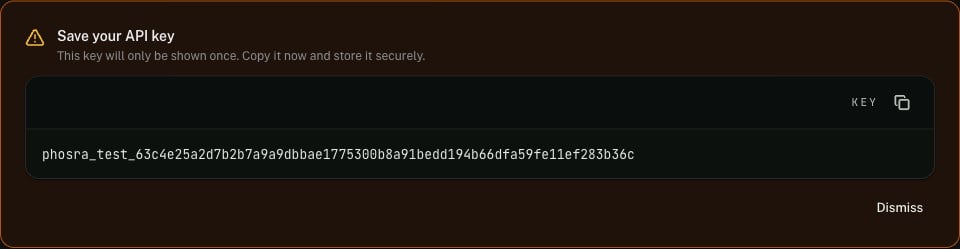
In the console, open **Developers → API Keys** and press **Create Key**. Give the key a name,
keep **Environment** on **Test** (test keys only ever touch sandbox data), and tick the scopes
it needs. On save, the console shows the **full secret exactly once** — copy it now; it is never
displayed again.
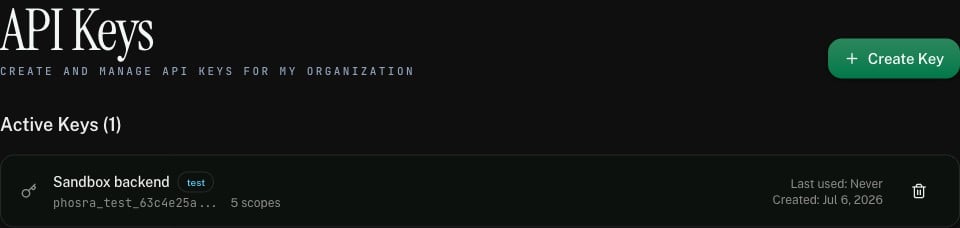
 The key then appears in your key list — name, `test` badge, truncated prefix, scope count, and
last-used time. You can revoke it here at any time; revoked keys stop authenticating immediately.
The key then appears in your key list — name, `test` badge, truncated prefix, scope count, and
last-used time. You can revoke it here at any time; revoked keys stop authenticating immediately.
 **Test vs. live.** A **test** key mints the `phosra_test_…` prefix and is scoped to sandbox
data. A **live** key mints `phosra_live_…` and reaches production. The two are interchangeable in
every request — only the base URL and the key change. See
[Authentication](/authentication) for the full bearer-key model.
### The same key, from the API
Prefer to script it? The control-plane mint returns the secret in the `201` body — the one and
only time it is exposed:
```bash theme={null}
# Authenticate as yourself (bearer session/JWT), create a key in your org.
curl -X POST "https://prodapi.phosra.com/api/v1/developers/orgs/$ORG_ID/keys" \
-H "Authorization: Bearer $YOUR_SESSION_TOKEN" \
-H "Content-Type: application/json" \
-d '{
"name": "Sandbox backend",
"environment": "test",
"scopes": ["read:families", "write:families", "read:children", "read:policies", "read:enforcement"]
}'
```
```json 201 Created — the secret appears once theme={null}
{
"id": "a6511526-cdb2-4e1a-9621-1f911cabce0d",
"org_id": "3a0b623d-c7bc-4925-ae3f-6963db5ee103",
"name": "Sandbox backend",
"key": "phosra_test_63c4e25a2d7b2b7a9a9dbbae1775300b8a91bedd194b66dfa59fe11ef283b36c",
"key_prefix": "phosra_test_63c4e25a",
"environment": "test",
"scopes": ["read:families", "write:families", "read:children", "read:policies", "read:enforcement"]
}
```
The `key` field is returned **only** on creation — subsequent `GET /developers/orgs/{id}/keys`
calls return the `key_prefix`, never the secret. Store it in a secret manager the moment you get
it. Lost a key? Revoke it and mint a new one.
## 2 — Set up a child to enforce against
Enforcement needs something to enforce: a child with an active policy, and at least one verified
platform to push it to. The console's **Quick Setup** does the first half in one screen; here is
the same call. Every response below is **verbatim live output** from the sandbox.
```bash cURL theme={null}
export BASE="https://phosra-api-sandbox-production.up.railway.app/api/v1"
# 1. Child + active policy + age-appropriate rules, in one call.
curl -s -X POST "$BASE/setup/quick" \
-H "Content-Type: application/json" \
-d '{ "child_name": "Emma", "birth_date": "2015-03-15", "strictness": "recommended" }'
```
```typescript TypeScript theme={null}
const BASE = "https://phosra-api-sandbox-production.up.railway.app/api/v1";
const setup = await fetch(`${BASE}/setup/quick`, {
method: "POST",
headers: { "Content-Type": "application/json" },
body: JSON.stringify({ child_name: "Emma", birth_date: "2015-03-15", strictness: "recommended" }),
}).then((r) => r.json());
console.log(setup.child.id); // keep for the enforce call
console.log(setup.policy.status); // "active"
```
```python Python theme={null}
import requests
BASE = "https://phosra-api-sandbox-production.up.railway.app/api/v1"
setup = requests.post(f"{BASE}/setup/quick", json={
"child_name": "Emma", "birth_date": "2015-03-15", "strictness": "recommended",
}, timeout=30).json()
print(setup["child"]["id"]) # keep for the enforce call
print(setup["policy"]["status"]) # "active"
```
```json Live sandbox response (trimmed, 200 OK) theme={null}
{
"family": { "id": "0c5d309b-589a-4b45-932f-6253a9dab9f0", "name": "Emma's Family" },
"child": { "id": "ef56fc21-2eda-4763-9b46-33834a5d3952", "name": "Emma",
"birth_date": "2015-03-15T00:00:00Z" },
"policy": { "id": "7ebefe7a-538f-4e34-840a-3057a9f1ae0a",
"name": "Emma's Protection Policy", "status": "active" },
"rules_count": 20
}
```
Then verify a platform so there's somewhere to push the policy. In production this is a real
connect ceremony (see [Connect a platform](/guides/connect-a-platform)); in the sandbox a single
call stands in:
```bash theme={null}
curl -s -X POST "$BASE/compliance" \
-H "Content-Type: application/json" \
-d '{ "family_id": "0c5d309b-589a-4b45-932f-6253a9dab9f0", "platform_id": "apple", "credentials": "sandbox-demo" }'
# → { "id": "d962f0eb-…", "platform_id": "apple", "status": "verified", "verified_at": "2026-07-06T08:07:00Z" }
```
## 3 — Enforce, then read the verdict
Push the policy for the child. Enforcement is asynchronous — the call returns a **job**
(`202 Accepted`) that resolves to a per-platform verdict:
```bash theme={null}
CHILD_ID="ef56fc21-2eda-4763-9b46-33834a5d3952"
# Kick off enforcement across every verified platform → 202 with a job id.
JOB=$(curl -s -X POST "$BASE/children/$CHILD_ID/enforce" | jq -r .id)
# Read the per-platform results once the job settles.
curl -s "$BASE/enforcement/jobs/$JOB/results" | jq '.[] | {platform_id, status, rules_applied, rules_skipped, rules_failed}'
```
In the console, the same result is the **Enforcement Status** matrix: one row per child, one
column per verified platform, each cell a live verdict — **Enforced**, **Partial**, **Failed**,
**Running**, or **Pending**.
**Test vs. live.** A **test** key mints the `phosra_test_…` prefix and is scoped to sandbox
data. A **live** key mints `phosra_live_…` and reaches production. The two are interchangeable in
every request — only the base URL and the key change. See
[Authentication](/authentication) for the full bearer-key model.
### The same key, from the API
Prefer to script it? The control-plane mint returns the secret in the `201` body — the one and
only time it is exposed:
```bash theme={null}
# Authenticate as yourself (bearer session/JWT), create a key in your org.
curl -X POST "https://prodapi.phosra.com/api/v1/developers/orgs/$ORG_ID/keys" \
-H "Authorization: Bearer $YOUR_SESSION_TOKEN" \
-H "Content-Type: application/json" \
-d '{
"name": "Sandbox backend",
"environment": "test",
"scopes": ["read:families", "write:families", "read:children", "read:policies", "read:enforcement"]
}'
```
```json 201 Created — the secret appears once theme={null}
{
"id": "a6511526-cdb2-4e1a-9621-1f911cabce0d",
"org_id": "3a0b623d-c7bc-4925-ae3f-6963db5ee103",
"name": "Sandbox backend",
"key": "phosra_test_63c4e25a2d7b2b7a9a9dbbae1775300b8a91bedd194b66dfa59fe11ef283b36c",
"key_prefix": "phosra_test_63c4e25a",
"environment": "test",
"scopes": ["read:families", "write:families", "read:children", "read:policies", "read:enforcement"]
}
```
The `key` field is returned **only** on creation — subsequent `GET /developers/orgs/{id}/keys`
calls return the `key_prefix`, never the secret. Store it in a secret manager the moment you get
it. Lost a key? Revoke it and mint a new one.
## 2 — Set up a child to enforce against
Enforcement needs something to enforce: a child with an active policy, and at least one verified
platform to push it to. The console's **Quick Setup** does the first half in one screen; here is
the same call. Every response below is **verbatim live output** from the sandbox.
```bash cURL theme={null}
export BASE="https://phosra-api-sandbox-production.up.railway.app/api/v1"
# 1. Child + active policy + age-appropriate rules, in one call.
curl -s -X POST "$BASE/setup/quick" \
-H "Content-Type: application/json" \
-d '{ "child_name": "Emma", "birth_date": "2015-03-15", "strictness": "recommended" }'
```
```typescript TypeScript theme={null}
const BASE = "https://phosra-api-sandbox-production.up.railway.app/api/v1";
const setup = await fetch(`${BASE}/setup/quick`, {
method: "POST",
headers: { "Content-Type": "application/json" },
body: JSON.stringify({ child_name: "Emma", birth_date: "2015-03-15", strictness: "recommended" }),
}).then((r) => r.json());
console.log(setup.child.id); // keep for the enforce call
console.log(setup.policy.status); // "active"
```
```python Python theme={null}
import requests
BASE = "https://phosra-api-sandbox-production.up.railway.app/api/v1"
setup = requests.post(f"{BASE}/setup/quick", json={
"child_name": "Emma", "birth_date": "2015-03-15", "strictness": "recommended",
}, timeout=30).json()
print(setup["child"]["id"]) # keep for the enforce call
print(setup["policy"]["status"]) # "active"
```
```json Live sandbox response (trimmed, 200 OK) theme={null}
{
"family": { "id": "0c5d309b-589a-4b45-932f-6253a9dab9f0", "name": "Emma's Family" },
"child": { "id": "ef56fc21-2eda-4763-9b46-33834a5d3952", "name": "Emma",
"birth_date": "2015-03-15T00:00:00Z" },
"policy": { "id": "7ebefe7a-538f-4e34-840a-3057a9f1ae0a",
"name": "Emma's Protection Policy", "status": "active" },
"rules_count": 20
}
```
Then verify a platform so there's somewhere to push the policy. In production this is a real
connect ceremony (see [Connect a platform](/guides/connect-a-platform)); in the sandbox a single
call stands in:
```bash theme={null}
curl -s -X POST "$BASE/compliance" \
-H "Content-Type: application/json" \
-d '{ "family_id": "0c5d309b-589a-4b45-932f-6253a9dab9f0", "platform_id": "apple", "credentials": "sandbox-demo" }'
# → { "id": "d962f0eb-…", "platform_id": "apple", "status": "verified", "verified_at": "2026-07-06T08:07:00Z" }
```
## 3 — Enforce, then read the verdict
Push the policy for the child. Enforcement is asynchronous — the call returns a **job**
(`202 Accepted`) that resolves to a per-platform verdict:
```bash theme={null}
CHILD_ID="ef56fc21-2eda-4763-9b46-33834a5d3952"
# Kick off enforcement across every verified platform → 202 with a job id.
JOB=$(curl -s -X POST "$BASE/children/$CHILD_ID/enforce" | jq -r .id)
# Read the per-platform results once the job settles.
curl -s "$BASE/enforcement/jobs/$JOB/results" | jq '.[] | {platform_id, status, rules_applied, rules_skipped, rules_failed}'
```
In the console, the same result is the **Enforcement Status** matrix: one row per child, one
column per verified platform, each cell a live verdict — **Enforced**, **Partial**, **Failed**,
**Running**, or **Pending**.
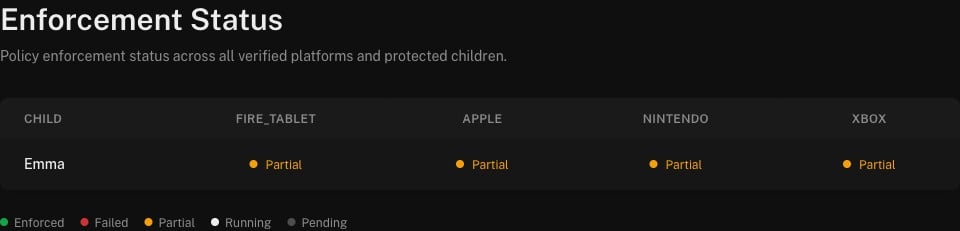 Click any cell for the per-rule breakdown. Here is the same verdict the matrix renders, verbatim
from the sandbox — Apple accepted 16 of the policy's rules and returned one it could not apply:
```json GET /enforcement/jobs/{id}/results → 200 theme={null}
{
"id": "1b84f71c-5381-4102-b22d-ea2ef8a14cf6",
"platform_id": "apple",
"status": "partial",
"rules_applied": 16,
"rules_skipped": 0,
"rules_failed": 1
}
```
**Why "Partial" and not "Enforced"?** A verdict reflects what the target platform actually
accepted. `apple` is a `device` platform: most rules are queued for on-device sync, and a rule
the platform can't represent is reported as `rules_failed` rather than silently dropped — so the
job settles as `partial`, not `completed`. That honesty is the point: the verdict tells you
exactly how many rules landed. A `dns` platform that applies every rule server-side settles as
`completed` / **Enforced**. See [Enforcement](/concepts/enforcement) for the mode-by-mode model
and [Platforms & enforcement modes](/concepts/platforms) for which platforms do what.
## Next steps
The self-serve funnel from zero to a `phosra_test_` key.
Bearer keys vs. DID signatures — when each applies.
Jobs, verdicts, and the `dns` / `device` / `manual_attested` modes.
Every error `code` and `class` the API can return.
Click any cell for the per-rule breakdown. Here is the same verdict the matrix renders, verbatim
from the sandbox — Apple accepted 16 of the policy's rules and returned one it could not apply:
```json GET /enforcement/jobs/{id}/results → 200 theme={null}
{
"id": "1b84f71c-5381-4102-b22d-ea2ef8a14cf6",
"platform_id": "apple",
"status": "partial",
"rules_applied": 16,
"rules_skipped": 0,
"rules_failed": 1
}
```
**Why "Partial" and not "Enforced"?** A verdict reflects what the target platform actually
accepted. `apple` is a `device` platform: most rules are queued for on-device sync, and a rule
the platform can't represent is reported as `rules_failed` rather than silently dropped — so the
job settles as `partial`, not `completed`. That honesty is the point: the verdict tells you
exactly how many rules landed. A `dns` platform that applies every rule server-side settles as
`completed` / **Enforced**. See [Enforcement](/concepts/enforcement) for the mode-by-mode model
and [Platforms & enforcement modes](/concepts/platforms) for which platforms do what.
## Next steps
The self-serve funnel from zero to a `phosra_test_` key.
Bearer keys vs. DID signatures — when each applies.
Jobs, verdicts, and the `dns` / `device` / `manual_attested` modes.
Every error `code` and `class` the API can return.