> ## Documentation Index
> Fetch the complete documentation index at: https://docs.phosra.com/llms.txt
> Use this file to discover all available pages before exploring further.
# Disconnect & reconnect
> Handle a declined connection, tear down a platform link, and re-approve cleanly — with the sandbox decline path shown live and the production teardown documented.
Connections do not last forever. A parent declines the consent screen, revokes access later, or
removes a platform and adds it back. This guide covers every path — the **decline**, the
production **teardown**, and the **reconnect** — with the sandbox portions run live.
**Sandbox-first.** The consent and reconnect paths below run against
`https://phosra-api-sandbox-production.up.railway.app` with no key. The production teardown
(`DELETE /compliance/{linkID}`) is family-scoped and requires a `phosra_live_…` key, so it is
documented here rather than run anonymously.
## Before you start
```bash theme={null}
export PHOSRA_BASE="https://phosra-api-sandbox-production.up.railway.app"
```
You should already understand the connect ceremony from
[Connect a platform](/guides/connect-a-platform) — disconnect and reconnect are its mirror image.
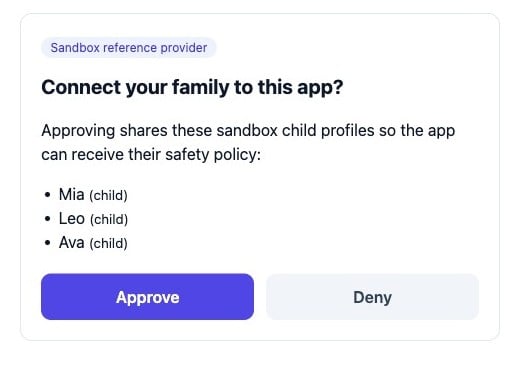
When a parent chooses **Deny** on the consent page, Phosra redirects back to your
`redirect_uri` with an `error` and **no code**. Never treat a missing code as success:
 ```
GET /oauth/authorize?client_id=did:ocss:loopline&decision=deny&redirect_uri=…&state=xyz789
302 Location: https://loopline.example/callback?error=access_denied&state=xyz789
```
Your callback handler must branch on the query string:
```typescript TypeScript theme={null}
// In your redirect_uri handler
const url = new URL(request.url);
if (url.searchParams.get("error")) {
// e.g. "access_denied" — the parent declined. Stop; do not exchange a token.
return showConnectDeclined();
}
const code = url.searchParams.get("code");
// …proceed to the token exchange
```
```python Python theme={null}
# In your redirect_uri handler
err = request.args.get("error")
if err: # e.g. "access_denied" — the parent declined
return show_connect_declined()
code = request.args.get("code")
# …proceed to the token exchange
```
```go Go theme={null}
// In your redirect_uri handler
if err := r.URL.Query().Get("error"); err != "" {
// e.g. "access_denied" — the parent declined
showConnectDeclined(w)
return
}
code := r.URL.Query().Get("code")
// …proceed to the token exchange
```
Always compare the returned `state` against the value you generated before you act on either
branch. A mismatched `state` means the response is not for this request — discard it.
**Query parameters on the `deny` redirect**
| Field | Type | Present | Description |
| ------- | ------ | ------------- | ---------------------------------------------------------- |
| `error` | string | on deny | `access_denied` — the parent declined. No token is issued. |
| `state` | string | always | The `state` you sent; compare before acting. |
| `code` | — | never on deny | Absent. If `error` is set, do not look for a `code`. |
**How to branch**
| Callback contains | Meaning | Do |
| --------------------- | --------------- | ------------------------------------------------------------------------------------- |
| `error=access_denied` | Parent declined | Show a "connection declined" state; offer to retry later. |
| `code=…` | Parent approved | Proceed to the token exchange (see [Connect a platform](/guides/connect-a-platform)). |
For platforms you connected with a stored per-family credential (`POST /compliance`), remove the
link with `DELETE /compliance/{linkID}`. This stops all future enforcement to that platform and
is the durable "disconnect" for account-linked integrations:
```bash cURL theme={null}
curl -s -X DELETE "https://prodapi.phosra.com/api/v1/compliance/$LINK_ID" \
-H "X-Api-Key: $PHOSRA_API_KEY"
```
```typescript TypeScript theme={null}
await fetch(`https://prodapi.phosra.com/api/v1/compliance/${linkId}`, {
method: "DELETE",
headers: { "X-Api-Key": process.env.PHOSRA_API_KEY! },
});
```
```python Python theme={null}
requests.delete(
f"https://prodapi.phosra.com/api/v1/compliance/{link_id}",
headers={"X-Api-Key": os.environ["PHOSRA_API_KEY"]},
timeout=30,
)
```
```go Go theme={null}
req, _ := http.NewRequest("DELETE",
"https://prodapi.phosra.com/api/v1/compliance/"+linkID, nil)
req.Header.Set("X-Api-Key", os.Getenv("PHOSRA_API_KEY"))
http.DefaultClient.Do(req)
```
`GET /families/{familyID}/compliance` returns every active link with its `link_id`, so you can
find the one to remove. Both endpoints are family-scoped: an anonymous caller who is not a
member of the family gets `403 not a member of this family`. List active links first, then
delete the one you mean to remove.
**Path parameter**
| Field | Type | Required | Description |
| -------- | ------------- | :------: | --------------------------------------------------------- |
| `linkID` | string (UUID) | yes | The `link_id` from `GET /families/{familyID}/compliance`. |
**Request header**
| Header | Required | Description |
| ----------- | :--------------: | -------------------------------------------------------------------- |
| `X-Api-Key` | yes (production) | Your `phosra_live_…` key. The caller must be a member of the family. |
**Response**
| Status | Meaning |
| :-----------: | ---------------------------------------------------------------- |
| `204` / `200` | Link removed; no further enforcement is pushed to that platform. |
**Errors**
| Status | `message` | When it happens |
| :----: | ----------------------------- | --------------------------------------------------------------- |
| `403` | `not a member of this family` | The caller is not authorised for the family that owns the link. |
| `404` | `compliance link not found` | No link exists for that `linkID`. |
These endpoints are family-scoped and require an authenticated member, so they cannot be
exercised anonymously against the open sandbox — the statuses above are the production contract.
The sandbox does confirm the shape: an anonymous `DELETE` of an unknown id returns
`404 compliance link not found`, and `GET /families/{id}/compliance` returns
`403 not a member of this family`.
Reconnecting is simply re-running the connect ceremony. Send the parent back to the consent
page with a **fresh** `state`; on **Approve** you get a new code, and the token exchange yields a
new access token. The old token is never reused.
```
GET /oauth/authorize?client_id=did:ocss:loopline&decision=approve&redirect_uri=…&state=abc123
302 Location: https://loopline.example/callback?code=sbxauth_9LuPuXKcNA5…&state=abc123
```
```bash cURL theme={null}
curl -s -X POST "$PHOSRA_BASE/oauth/token" \
-H "Content-Type: application/json" \
-d '{
"grant_type": "authorization_code",
"code": "sbxauth_9LuPuXKcNA5…",
"client_id": "did:ocss:loopline",
"redirect_uri": "https://loopline.example/callback"
}'
```
```typescript TypeScript theme={null}
const tok = await fetch(`${PHOSRA_BASE}/oauth/token`, {
method: "POST",
headers: { "Content-Type": "application/json" },
body: JSON.stringify({
grant_type: "authorization_code",
code, // fresh code from the reconnect
client_id: "did:ocss:loopline",
redirect_uri: "https://loopline.example/callback",
}),
}).then((r) => r.json());
```
```python Python theme={null}
tok = requests.post(f"{PHOSRA_BASE}/oauth/token", json={
"grant_type": "authorization_code",
"code": code, # fresh code from the reconnect
"client_id": "did:ocss:loopline",
"redirect_uri": "https://loopline.example/callback",
}, timeout=30).json()
```
```go Go theme={null}
body, _ := json.Marshal(map[string]string{
"grant_type": "authorization_code",
"code": code, // fresh code from the reconnect
"client_id": "did:ocss:loopline",
"redirect_uri": "https://loopline.example/callback",
})
res, _ := http.Post(base+"/oauth/token", "application/json", bytes.NewReader(body))
defer res.Body.Close()
```
**Real response (200):**
```json theme={null}
{
"access_token": "sbxtok_tEMgnUnshlI_TSaZQWaxIH9mcdgjwdXT",
"expires_in": 3600,
"scope": "profiles",
"token_type": "Bearer"
}
```
The connection is live again. Child profiles flow from `GET /oauth/profiles` exactly as they
did before — pick up from the profiles step of [Connect a platform](/guides/connect-a-platform).
Identical to the first connect. Two reconnect-specific rules:
| Field | Type | Description |
| ------- | ------ | ---------------------------------------------------------------------------------------------- |
| `state` | string | Use a **fresh** value for the reconnect, distinct from the original grant. |
| `code` | string | The **new** code from the re-approval — an old code from the first grant must not be replayed. |
**Response fields (200)**
| Field | Type | Description |
| -------------- | ------- | ---------------------------------------------------------------------------------------- |
| `access_token` | string | A **new** bearer token; the previous one is not reused. |
| `expires_in` | integer | `3600` (1 hour). |
| `scope` | string | `profiles` — the same grant as before (equivalent to discovery's `child_profiles.read`). |
| `token_type` | string | `Bearer`. |
Full request-field and error tables live in [Connect a platform → the token step](/guides/connect-a-platform).
## After you reconnect
Re-run enforcement so the platform receives the current policy — a reconnected platform starts
from a clean slate:
```bash theme={null}
curl -s -X POST "https://prodapi.phosra.com/api/v1/children/$CHILD_ID/enforce" \
-H "X-Api-Key: $PHOSRA_API_KEY"
```
See [Set up a family & kids](/guides/family-and-kids)
for the full enforce-and-confirm loop.
## Next steps
The full connect ceremony this guide mirrors.
Everything you can exercise without a key, and how the Trust List works.
```
GET /oauth/authorize?client_id=did:ocss:loopline&decision=deny&redirect_uri=…&state=xyz789
302 Location: https://loopline.example/callback?error=access_denied&state=xyz789
```
Your callback handler must branch on the query string:
```typescript TypeScript theme={null}
// In your redirect_uri handler
const url = new URL(request.url);
if (url.searchParams.get("error")) {
// e.g. "access_denied" — the parent declined. Stop; do not exchange a token.
return showConnectDeclined();
}
const code = url.searchParams.get("code");
// …proceed to the token exchange
```
```python Python theme={null}
# In your redirect_uri handler
err = request.args.get("error")
if err: # e.g. "access_denied" — the parent declined
return show_connect_declined()
code = request.args.get("code")
# …proceed to the token exchange
```
```go Go theme={null}
// In your redirect_uri handler
if err := r.URL.Query().Get("error"); err != "" {
// e.g. "access_denied" — the parent declined
showConnectDeclined(w)
return
}
code := r.URL.Query().Get("code")
// …proceed to the token exchange
```
Always compare the returned `state` against the value you generated before you act on either
branch. A mismatched `state` means the response is not for this request — discard it.
**Query parameters on the `deny` redirect**
| Field | Type | Present | Description |
| ------- | ------ | ------------- | ---------------------------------------------------------- |
| `error` | string | on deny | `access_denied` — the parent declined. No token is issued. |
| `state` | string | always | The `state` you sent; compare before acting. |
| `code` | — | never on deny | Absent. If `error` is set, do not look for a `code`. |
**How to branch**
| Callback contains | Meaning | Do |
| --------------------- | --------------- | ------------------------------------------------------------------------------------- |
| `error=access_denied` | Parent declined | Show a "connection declined" state; offer to retry later. |
| `code=…` | Parent approved | Proceed to the token exchange (see [Connect a platform](/guides/connect-a-platform)). |
For platforms you connected with a stored per-family credential (`POST /compliance`), remove the
link with `DELETE /compliance/{linkID}`. This stops all future enforcement to that platform and
is the durable "disconnect" for account-linked integrations:
```bash cURL theme={null}
curl -s -X DELETE "https://prodapi.phosra.com/api/v1/compliance/$LINK_ID" \
-H "X-Api-Key: $PHOSRA_API_KEY"
```
```typescript TypeScript theme={null}
await fetch(`https://prodapi.phosra.com/api/v1/compliance/${linkId}`, {
method: "DELETE",
headers: { "X-Api-Key": process.env.PHOSRA_API_KEY! },
});
```
```python Python theme={null}
requests.delete(
f"https://prodapi.phosra.com/api/v1/compliance/{link_id}",
headers={"X-Api-Key": os.environ["PHOSRA_API_KEY"]},
timeout=30,
)
```
```go Go theme={null}
req, _ := http.NewRequest("DELETE",
"https://prodapi.phosra.com/api/v1/compliance/"+linkID, nil)
req.Header.Set("X-Api-Key", os.Getenv("PHOSRA_API_KEY"))
http.DefaultClient.Do(req)
```
`GET /families/{familyID}/compliance` returns every active link with its `link_id`, so you can
find the one to remove. Both endpoints are family-scoped: an anonymous caller who is not a
member of the family gets `403 not a member of this family`. List active links first, then
delete the one you mean to remove.
**Path parameter**
| Field | Type | Required | Description |
| -------- | ------------- | :------: | --------------------------------------------------------- |
| `linkID` | string (UUID) | yes | The `link_id` from `GET /families/{familyID}/compliance`. |
**Request header**
| Header | Required | Description |
| ----------- | :--------------: | -------------------------------------------------------------------- |
| `X-Api-Key` | yes (production) | Your `phosra_live_…` key. The caller must be a member of the family. |
**Response**
| Status | Meaning |
| :-----------: | ---------------------------------------------------------------- |
| `204` / `200` | Link removed; no further enforcement is pushed to that platform. |
**Errors**
| Status | `message` | When it happens |
| :----: | ----------------------------- | --------------------------------------------------------------- |
| `403` | `not a member of this family` | The caller is not authorised for the family that owns the link. |
| `404` | `compliance link not found` | No link exists for that `linkID`. |
These endpoints are family-scoped and require an authenticated member, so they cannot be
exercised anonymously against the open sandbox — the statuses above are the production contract.
The sandbox does confirm the shape: an anonymous `DELETE` of an unknown id returns
`404 compliance link not found`, and `GET /families/{id}/compliance` returns
`403 not a member of this family`.
Reconnecting is simply re-running the connect ceremony. Send the parent back to the consent
page with a **fresh** `state`; on **Approve** you get a new code, and the token exchange yields a
new access token. The old token is never reused.
```
GET /oauth/authorize?client_id=did:ocss:loopline&decision=approve&redirect_uri=…&state=abc123
302 Location: https://loopline.example/callback?code=sbxauth_9LuPuXKcNA5…&state=abc123
```
```bash cURL theme={null}
curl -s -X POST "$PHOSRA_BASE/oauth/token" \
-H "Content-Type: application/json" \
-d '{
"grant_type": "authorization_code",
"code": "sbxauth_9LuPuXKcNA5…",
"client_id": "did:ocss:loopline",
"redirect_uri": "https://loopline.example/callback"
}'
```
```typescript TypeScript theme={null}
const tok = await fetch(`${PHOSRA_BASE}/oauth/token`, {
method: "POST",
headers: { "Content-Type": "application/json" },
body: JSON.stringify({
grant_type: "authorization_code",
code, // fresh code from the reconnect
client_id: "did:ocss:loopline",
redirect_uri: "https://loopline.example/callback",
}),
}).then((r) => r.json());
```
```python Python theme={null}
tok = requests.post(f"{PHOSRA_BASE}/oauth/token", json={
"grant_type": "authorization_code",
"code": code, # fresh code from the reconnect
"client_id": "did:ocss:loopline",
"redirect_uri": "https://loopline.example/callback",
}, timeout=30).json()
```
```go Go theme={null}
body, _ := json.Marshal(map[string]string{
"grant_type": "authorization_code",
"code": code, // fresh code from the reconnect
"client_id": "did:ocss:loopline",
"redirect_uri": "https://loopline.example/callback",
})
res, _ := http.Post(base+"/oauth/token", "application/json", bytes.NewReader(body))
defer res.Body.Close()
```
**Real response (200):**
```json theme={null}
{
"access_token": "sbxtok_tEMgnUnshlI_TSaZQWaxIH9mcdgjwdXT",
"expires_in": 3600,
"scope": "profiles",
"token_type": "Bearer"
}
```
The connection is live again. Child profiles flow from `GET /oauth/profiles` exactly as they
did before — pick up from the profiles step of [Connect a platform](/guides/connect-a-platform).
Identical to the first connect. Two reconnect-specific rules:
| Field | Type | Description |
| ------- | ------ | ---------------------------------------------------------------------------------------------- |
| `state` | string | Use a **fresh** value for the reconnect, distinct from the original grant. |
| `code` | string | The **new** code from the re-approval — an old code from the first grant must not be replayed. |
**Response fields (200)**
| Field | Type | Description |
| -------------- | ------- | ---------------------------------------------------------------------------------------- |
| `access_token` | string | A **new** bearer token; the previous one is not reused. |
| `expires_in` | integer | `3600` (1 hour). |
| `scope` | string | `profiles` — the same grant as before (equivalent to discovery's `child_profiles.read`). |
| `token_type` | string | `Bearer`. |
Full request-field and error tables live in [Connect a platform → the token step](/guides/connect-a-platform).
## After you reconnect
Re-run enforcement so the platform receives the current policy — a reconnected platform starts
from a clean slate:
```bash theme={null}
curl -s -X POST "https://prodapi.phosra.com/api/v1/children/$CHILD_ID/enforce" \
-H "X-Api-Key: $PHOSRA_API_KEY"
```
See [Set up a family & kids](/guides/family-and-kids)
for the full enforce-and-confirm loop.
## Next steps
The full connect ceremony this guide mirrors.
Everything you can exercise without a key, and how the Trust List works.