Link a family to an external platform end-to-end — the OAuth connect ceremony, run live against the open sandbox with real requests and responses.
A platform (also called a provider) is anything Phosra can push a child-safety policy
to — a DNS filter, a router, an app, an operating system. Before Phosra can enforce anything,
a parent has to connect the platform and approve sharing their children’s profiles.This guide walks the full connect ceremony — discovery → consent → token → profiles —
against the public sandbox. Every request and response below is verbatim live output,
captured while writing this page. No API key, nothing to install.The four calls chain end to end: discover the endpoints (GET /providers/{did}/connect) →
send the parent to consent (authorize_url) → exchange the returned code for a token
(token_url) → read the approved profiles (profiles_url). Each step below carries a
Fields & errors reference you can expand.
Sandbox-first. The reference provider used here — did:ocss:loopline — is seeded into the
partner sandbox at https://phosra-api-sandbox-production.up.railway.app. Nothing you connect
there touches a real family. The endpoint shapes are identical in production; you swap the base
URL for https://prodapi.phosra.com and connect a real provider DID.
You will connect the sandbox’s reference provider, Loopline (did:ocss:loopline). It is a
real, accredited entry on the sandbox Trust List with a live OAuth
surface — the same shape a production provider exposes.
1
Discover the provider's connect endpoints
Every connectable provider publishes its OAuth endpoints at
GET /providers/{did}/connect. Start there — never hard-code the URLs.
A provider that is accredited but has not configured a connect surface returns
404 provider connect config not available. In the sandbox, did:ocss:courier is deliberately
left unconfigured so you can test that branch.
Fields & errors — GET /providers/{did}/connect
Path parameter
Field
Type
Required
Description
did
string
yes
The provider’s decentralized identifier, e.g. did:ocss:loopline. URL-encode the : characters if your client does not do it for you.
Response fields (200)
Field
Type
Description
authorize_url
string (URL)
Where you send the parent’s browser to grant consent (step 2).
token_url
string (URL)
Where you exchange the authorization code for a token (step 4).
profiles_url
string (URL)
Where you read the approved child profiles with the token.
scopes
string[]
The OAuth scopes the provider will request. Loopline requests child_profiles.read — read-only access to the approved children.
name
string
Human-readable provider name, safe to show a parent.
Errors
Status
message
When it happens
404
provider connect config not available
The DID is accredited but has no connect surface configured (e.g. did:ocss:courier). Do not retry — the provider must publish endpoints first.
Redirect the parent’s browser to authorize_url with your client_id (the provider DID),
a redirect_uri, and an opaque state you generate:
GET /oauth/authorize
      ?client_id=did:ocss:loopline
      &redirect_uri=https://loopline.example/callback
      &state=xyz789
      &response_type=code
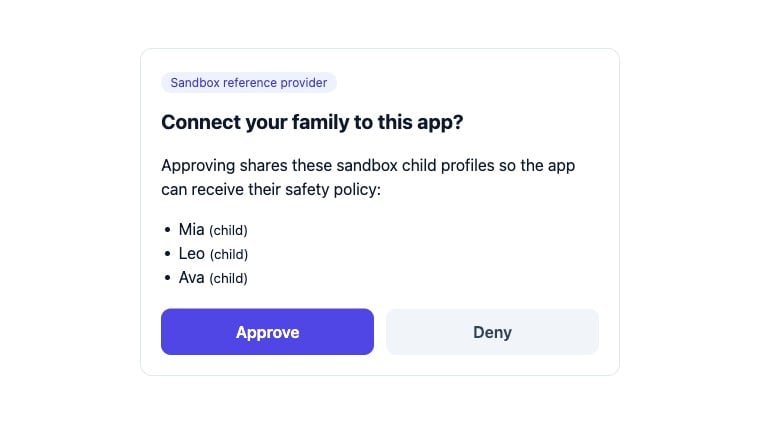
The sandbox serves a real consent screen. The parent sees exactly which child profiles they
are about to share, and chooses Approve or Deny:
The live sandbox consent page for did:ocss:loopline — captured from the running server, not a mockup.
This consent page is a sandbox demo, not a production IdP. The census’s reference authorize
surface auto-approves the seeded test family (Mia/Leo/Ava) with no login — a sandbox affordance,
gated to PHOSRA_ENV=sandbox (it returns 404 on the production census by design). In production,
the provider redirects to the platform’s ownauthorize_url, and the platform hosts this page.
The platform authenticates its real account holder (a genuine login or existing session) before
consent, and returns that account’s real child profiles to the token/profiles exchange — never a
seeded identity. The census never hosts a production consent IdP; the platform authenticates its own
users (EXT-04 §3.2 step 3). So when you go live, authorize_url points at your platform, not here.
Fields & errors — GET /oauth/authorize
Query parameters
Field
Type
Required
Description
client_id
string
yes
The provider DID you are connecting, e.g. did:ocss:loopline.
redirect_uri
string (URL)
yes
Where Phosra sends the parent back after they decide. Custom schemes (e.g. myapp://callback) are accepted for native apps.
state
string
yes
An opaque value you generate. It is echoed back unchanged — compare it on return to defend against CSRF.
response_type
string
yes
Always code for this flow.
Outcomes
Result
What Phosra returns
Parent approves
302 redirect to redirect_uri?code=…&state=… (step 3).
Parent denies
302 redirect to redirect_uri?error=access_denied&state=… — no code. Handle this branch; see Disconnect & reconnect.
Errors
Status
When it happens
400
redirect_uri is missing or malformed. Phosra will not redirect to an absent callback, so it fails closed with a 400 instead.
3
Receive the authorization code
On Approve, Phosra redirects back to your redirect_uri with a short-lived code and the
state you sent (verify it matches before continuing):
On the scope value. Discovery advertises the requested scope as child_profiles.read
(the canonical name), while the issued token echoes the short form scope: "profiles". Both
name the same grant — read-only access to the approved children. Key your logic off the token
you were issued, not off a hard-coded string, and treat the two as equivalent.
Fields & errors — POST /oauth/token
Request body (application/json)
Field
Type
Required
Description
grant_type
string
yes
Always authorization_code for this flow.
code
string
yes
The authorization code from the callback.
client_id
string
yes
The provider DID — must match the one you sent to authorize.
redirect_uri
string
yes
Must match the redirect_uri used at authorize.
Response fields (200)
Field
Type
Description
access_token
string
Bearer token (sbxtok_…) for GET /oauth/profiles.
expires_in
integer
Seconds until the token expires (3600 = 1 hour).
scope
string
The granted scope, returned as profiles — equivalent to the child_profiles.read scope from discovery (see note above).
token_type
string
Always Bearer. Send it as Authorization: Bearer <access_token>.
Errors
Status
error
When it happens
400
unsupported_grant_type
grant_type is missing or not authorization_code.
400
invalid_request
The body is malformed or a required field is absent.
Sandbox stub behaviour. The sandbox /oauth/token surface is a stateless reference stub:
it does not persist or validate the code, so an expired or reused code still returns a token in
the sandbox. In production, a provider’s real token endpoint returns 400 invalid_grant for an
expired, reused, or unknown code — write your error handling for that before you go live.
5
Read the shared child profiles
Call profiles_url with the token. You get back exactly the children the parent approved —
each with a stable subject_ref you use for policy and enforcement calls:
The platform is now connected. Hold onto each subject_ref — that is the handle you pass to
the policy and enforcement endpoints in Set up a family & kids.
Fields & errors — GET /oauth/profiles
Request header
Header
Required
Description
Authorization
yes
Bearer <access_token> from the token step.
Response fields (200) — an array, one object per approved child
Field
Type
Description
id
string
Provider-local child id (e.g. mia).
displayName
string
Child’s display name, safe to show a parent.
subject_ref
string (UUID)
Stable cross-system handle. Pass this to the policy and enforcement endpoints — it does not change across reconnects.
kind
string
Subject kind, child for these entries.
Errors
Status
error
When it happens
401
invalid_token
No Authorization header was sent.
Sandbox stub behaviour. Because the sandbox surface is stateless, any non-empty
Bearer value returns the seeded profiles — only a missing header yields 401. A production
provider validates the token and returns 401 invalid_token for any expired or forged token, so
treat 401 as “re-run the connect ceremony” in your client.
Not every platform can enforce every rule. Discovery endpoints let you pick the right one
before you ask a parent to connect:
# Every platform that can do DNS-level web filteringcurl -s "$PHOSRA_BASE/api/v1/platforms/by-capability?capability=web_filtering"# → [ "fire_tablet", "apple", "microsoft", "cleanbrowsing", "controld", "nextdns" ]
# Every DNS platformcurl -s "$PHOSRA_BASE/api/v1/platforms/by-category?category=dns"# → [ "cleanbrowsing", "controld", "nextdns" ]
Check each platform’s enforcement_mode: dns, device, and oauth2 platforms are
applied programmatically, while manual_attested platforms require the parent to complete a
guided step by hand. See Platforms & enforcement modes.
In production, connecting an account-linked platform (one where you hold a per-family
credential rather than an OAuth grant) uses POST /compliance with your phosra_live_… key —
see First-time setup. Those endpoints are family-scoped and require
an authenticated caller who is a member of the family, so they cannot be exercised
anonymously against the open sandbox. The OAuth ceremony above is the anonymous, fully
runnable path.