

Base URL for every call below:Swap it for
https://prodapi.phosra.com and add a phosra_live_… key when you go to
production — the request shapes are identical.Three ways to try it
Inline “Try it”
Every endpoint in the API Reference has a Try it panel — fill in
parameters, hit send, read the response, right next to the docs.
Hosted request runner
A standalone in-page runner on phosra.com that fires real keyless calls at the sandbox and
shows status, latency, and body.
Copy-paste cURL
Every snippet below is verbatim and runs as-is in your terminal against the live sandbox.
The hosted request runner
The API playground on phosra.com is an in-page request runner. Pick an operation, press Send, and it makes a real HTTP round-trip to the hosted sandbox and shows you the true status code, latency, and JSON body — nothing is mocked.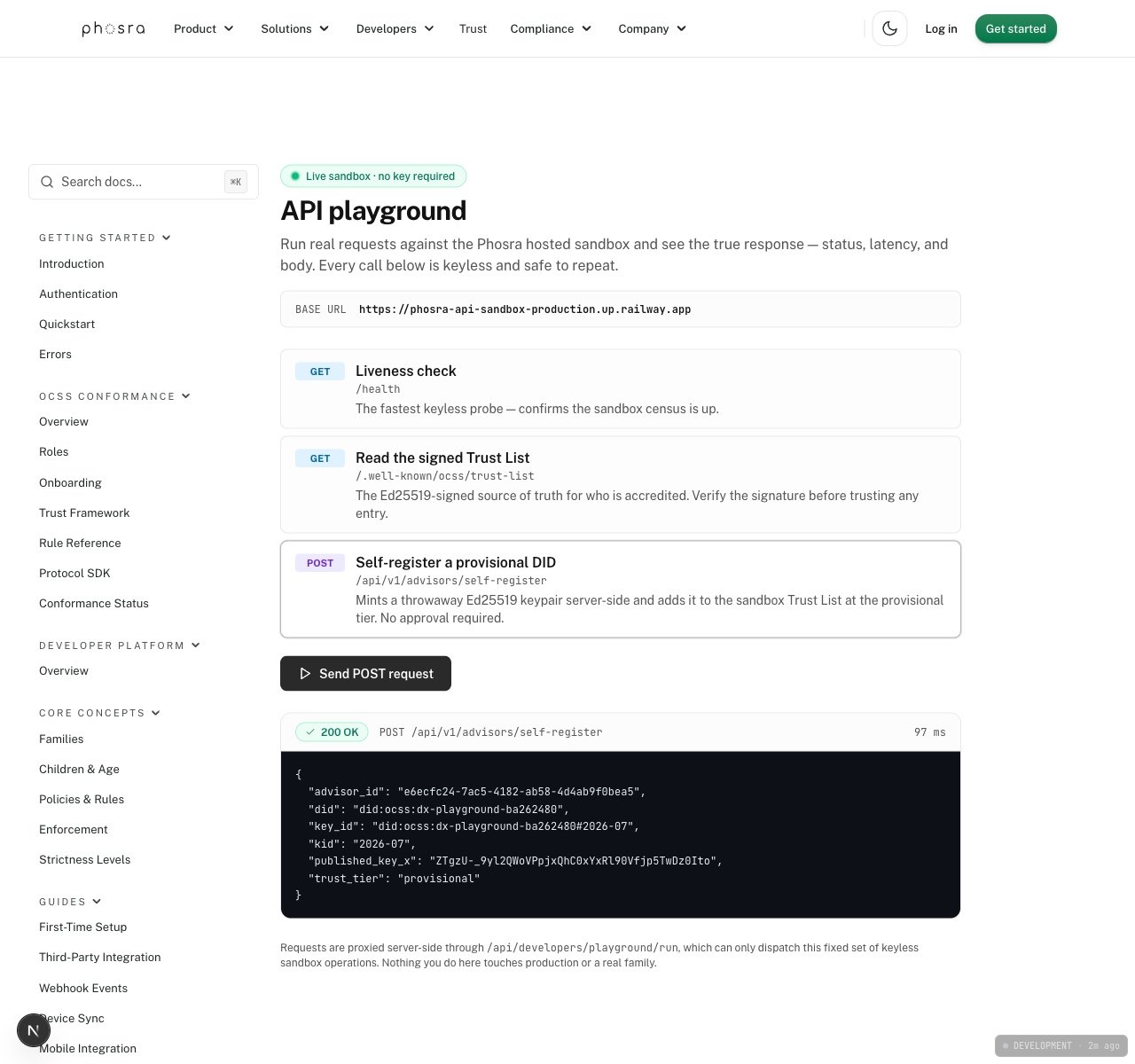
A real self-registration against the live sandbox — HTTP 200 in 97 ms, returning a fresh provisional Trust List entry.
Run it yourself, right now
These three calls need no key and are safe to repeat. Each response below is verbatim live output, captured while writing this page.1
Confirm the sandbox is up
2
Read the signed Trust List
The Trust List is the Ed25519-signed source of truth for who is accredited. Verify the signature
before you trust any entry inside it.Real response (200):
entries is a live, growing number — every self-registration (next step) adds one, so expect
a value at or above the one shown here. Verify the signature and each entry’s tier rather than
asserting on the total.3
Self-register a provisional DID
You do not need anyone’s approval to start testing signed flows. Mint an Ed25519 keypair, post
the raw public key, and the census adds you to the sandbox Trust List at the Real response (200):You are now on the sandbox Trust List. The
provisional
tier.key_id (did#kid) is what you sign requests with;
the census publishes your public key so counterparties can verify you.Re-registering the same DID returns
409 did_already_registered — pick a fresh DID (the
hosted runner appends a random suffix per run for exactly this reason). Moving from provisional
to verified or accredited is a governance step, not an API call — see
Production accreditation.The inline “Try it” panel
Open any endpoint in the API Reference — for example Create Family — and you will see a Try it panel rendered from the OpenAPI spec. It is pre-pointed at the hosted sandbox server, so you can fill in a body, send, and read the live response without leaving the page. Endpoints that require auth take aphosra_test_… key in the Authorization field; the keyless endpoints above need
nothing.
What you cannot break
Everything on this page and in the inline runner hits the sandbox, never production:- The sandbox is seeded with a fictional demo family (
Mia,Leo,Ava) — no real child data. - Self-registration lands at the
provisionaltier, which carries no weight in production. - The base URL is hard-coded per surface; there is no way to redirect a sandbox call to
prodapi.phosra.com.
Test in the sandbox
The full map of what is seeded, what is open, and how to get onto the Trust List.
Quickstart
Zero to an enforced policy in under five minutes.