The developer console is where you mint API keys, wire up a family, and watch enforcement land on real platforms. This guide walks the two tasks you’ll do first — mint a phosra_test_ key and read an enforcement verdict — with screenshots captured from the running dashboard, then shows the exact API calls behind each screen so you can script them.
Two ways to do everything. Every action in the console maps to a plain HTTP call. The screenshots below show the point-and-click path; the code blocks show the same result against the open sandbox at https://phosra-api-sandbox-production.up.railway.app — no key, nothing to install. Swap the base URL for https://prodapi.phosra.com/api/v1 and add your minted key to go to production.

1 — Mint a phosra_test_ key

In the console, open Developers → API Keys and press Create Key. Give the key a name, keep Environment on Test (test keys only ever touch sandbox data), and tick the scopes it needs. On save, the console shows the full secret exactly once — copy it now; it is never displayed again.
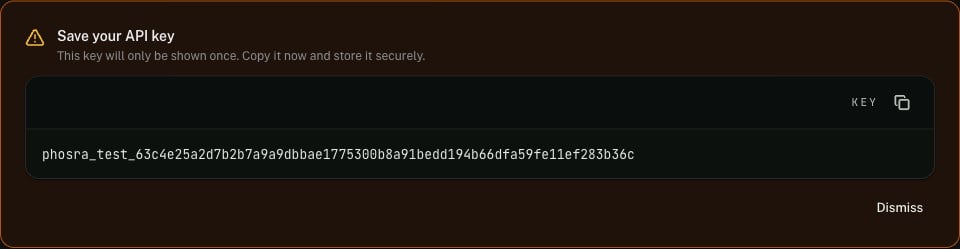
Phosra developer console 'Save your API key' banner showing a freshly minted phosra_test_ secret in a copyable code field, with a warning that the key is shown only once
The key then appears in your key list — name, test badge, truncated prefix, scope count, and last-used time. You can revoke it here at any time; revoked keys stop authenticating immediately.
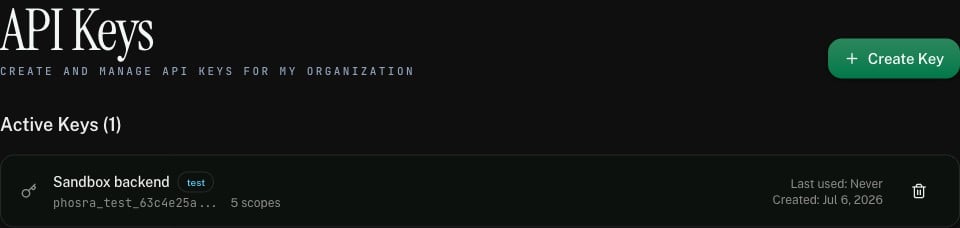
Phosra developer console API Keys page listing an active key named 'Sandbox backend' with a test badge, a phosra_test_ prefix, 5 scopes, and a created date
Test vs. live. A test key mints the phosra_test_… prefix and is scoped to sandbox data. A live key mints phosra_live_… and reaches production. The two are interchangeable in every request — only the base URL and the key change. See Authentication for the full bearer-key model.

The same key, from the API

Prefer to script it? The control-plane mint returns the secret in the 201 body — the one and only time it is exposed:
# Authenticate as yourself (bearer session/JWT), create a key in your org.
curl -X POST "https://prodapi.phosra.com/api/v1/developers/orgs/$ORG_ID/keys" \
  -H "Authorization: Bearer $YOUR_SESSION_TOKEN" \
  -H "Content-Type: application/json" \
  -d '{
    "name": "Sandbox backend",
    "environment": "test",
    "scopes": ["read:families", "write:families", "read:children", "read:policies", "read:enforcement"]
  }'
201 Created — the secret appears once
{
  "id": "a6511526-cdb2-4e1a-9621-1f911cabce0d",
  "org_id": "3a0b623d-c7bc-4925-ae3f-6963db5ee103",
  "name": "Sandbox backend",
  "key": "phosra_test_63c4e25a2d7b2b7a9a9dbbae1775300b8a91bedd194b66dfa59fe11ef283b36c",
  "key_prefix": "phosra_test_63c4e25a",
  "environment": "test",
  "scopes": ["read:families", "write:families", "read:children", "read:policies", "read:enforcement"]
}
The key field is returned only on creation — subsequent GET /developers/orgs/{id}/keys calls return the key_prefix, never the secret. Store it in a secret manager the moment you get it. Lost a key? Revoke it and mint a new one.

2 — Set up a child to enforce against

Enforcement needs something to enforce: a child with an active policy, and at least one verified platform to push it to. The console’s Quick Setup does the first half in one screen; here is the same call. Every response below is verbatim live output from the sandbox.
export BASE="https://phosra-api-sandbox-production.up.railway.app/api/v1"

# 1. Child + active policy + age-appropriate rules, in one call.
curl -s -X POST "$BASE/setup/quick" \
  -H "Content-Type: application/json" \
  -d '{ "child_name": "Emma", "birth_date": "2015-03-15", "strictness": "recommended" }'
Live sandbox response (trimmed, 200 OK)
{
  "family": { "id": "0c5d309b-589a-4b45-932f-6253a9dab9f0", "name": "Emma's Family" },
  "child":  { "id": "ef56fc21-2eda-4763-9b46-33834a5d3952", "name": "Emma",
              "birth_date": "2015-03-15T00:00:00Z" },
  "policy": { "id": "7ebefe7a-538f-4e34-840a-3057a9f1ae0a",
              "name": "Emma's Protection Policy", "status": "active" },
  "rules_count": 20
}
Then verify a platform so there’s somewhere to push the policy. In production this is a real connect ceremony (see Connect a platform); in the sandbox a single call stands in:
curl -s -X POST "$BASE/compliance" \
  -H "Content-Type: application/json" \
  -d '{ "family_id": "0c5d309b-589a-4b45-932f-6253a9dab9f0", "platform_id": "apple", "credentials": "sandbox-demo" }'
# → { "id": "d962f0eb-…", "platform_id": "apple", "status": "verified", "verified_at": "2026-07-06T08:07:00Z" }

3 — Enforce, then read the verdict

Push the policy for the child. Enforcement is asynchronous — the call returns a job (202 Accepted) that resolves to a per-platform verdict:
CHILD_ID="ef56fc21-2eda-4763-9b46-33834a5d3952"

# Kick off enforcement across every verified platform → 202 with a job id.
JOB=$(curl -s -X POST "$BASE/children/$CHILD_ID/enforce" | jq -r .id)

# Read the per-platform results once the job settles.
curl -s "$BASE/enforcement/jobs/$JOB/results" | jq '.[] | {platform_id, status, rules_applied, rules_skipped, rules_failed}'
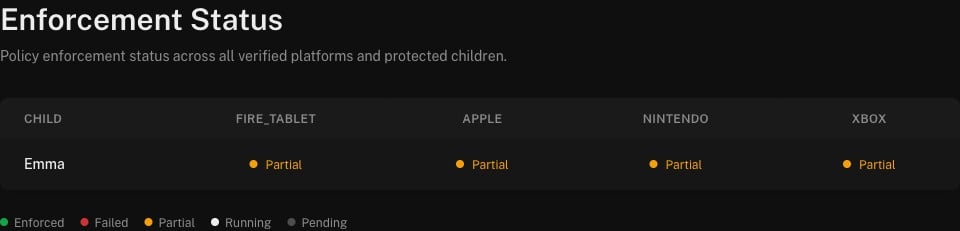
In the console, the same result is the Enforcement Status matrix: one row per child, one column per verified platform, each cell a live verdict — Enforced, Partial, Failed, Running, or Pending.
Phosra developer console Enforcement Status matrix: child Emma across fire_tablet, apple, nintendo, and xbox columns, each showing a Partial verdict, with a legend for Enforced, Failed, Partial, Running, and Pending
Click any cell for the per-rule breakdown. Here is the same verdict the matrix renders, verbatim from the sandbox — Apple accepted 16 of the policy’s rules and returned one it could not apply:
GET /enforcement/jobs/{id}/results → 200
{
  "id": "1b84f71c-5381-4102-b22d-ea2ef8a14cf6",
  "platform_id": "apple",
  "status": "partial",
  "rules_applied": 16,
  "rules_skipped": 0,
  "rules_failed": 1
}
Why “Partial” and not “Enforced”? A verdict reflects what the target platform actually accepted. apple is a device platform: most rules are queued for on-device sync, and a rule the platform can’t represent is reported as rules_failed rather than silently dropped — so the job settles as partial, not completed. That honesty is the point: the verdict tells you exactly how many rules landed. A dns platform that applies every rule server-side settles as completed / Enforced. See Enforcement for the mode-by-mode model and Platforms & enforcement modes for which platforms do what.

Next steps

Create your account & get keys

The self-serve funnel from zero to a phosra_test_ key.

Authentication

Bearer keys vs. DID signatures — when each applies.

Enforcement

Jobs, verdicts, and the dns / device / manual_attested modes.

Errors

Every error code and class the API can return.